How to generate 3D models in Claude and import them into Blender
Claude can make 3D models with the Artificial Studio MCP. Generate GLB models from text or images. Guide for designer, 3D artists, game developers, creative agencies and freelancers.
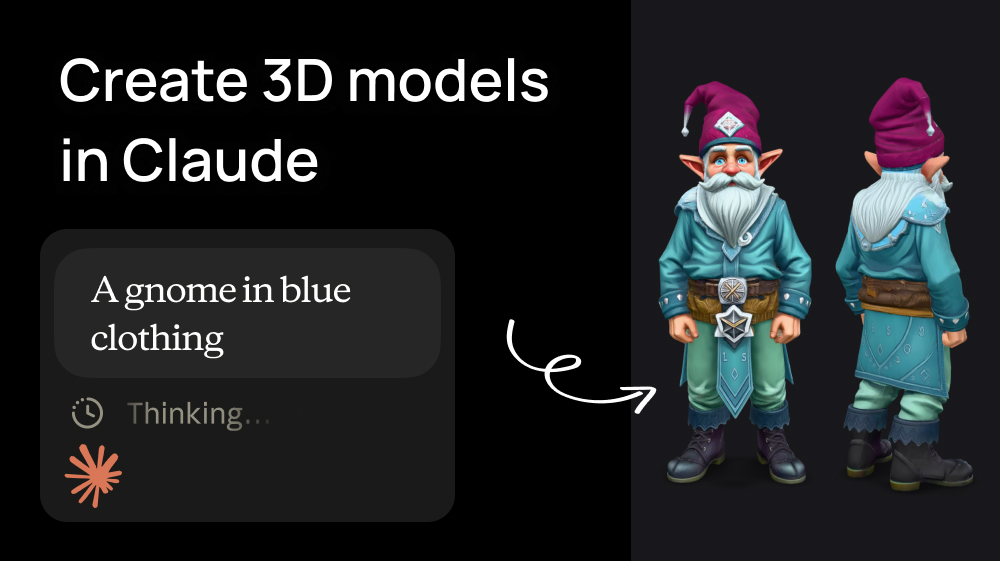
Short answer: Claude can generate real 3D models if you connect the Artificial Studio MCP. Claude can then create GLB models from a text prompt or an image. A 3D model costs between 4 and 160 credits, and plans with 1300 credits start at $9/month.
MCP (Model Context Protocol) is the open standard that lets Claude or ChatGPT use external tools. When you connect the Artificial Studio MCP, Claude gets access to more than 100 AI models for image, video, audio, music and 3D generation.
Step 1: Connect Artificial Studio to Claude
The Artificial Studio MCP is a remote server at https://api.artificialstudio.ai/mcp. It uses a secure sign-in with your Artificial Studio account, so there are no API keys to copy or store. Choose the method that matches how you use Claude.
Method 1: Claude Desktop or Claude.ai (no code)
- In Claude, open Customize → Connectors.
- Click Add, then Add custom connector.
- Paste this URL:
https://api.artificialstudio.ai/mcp - Click Continue, then Add.
- A browser window opens. Sign in to Artificial Studio and approve access.
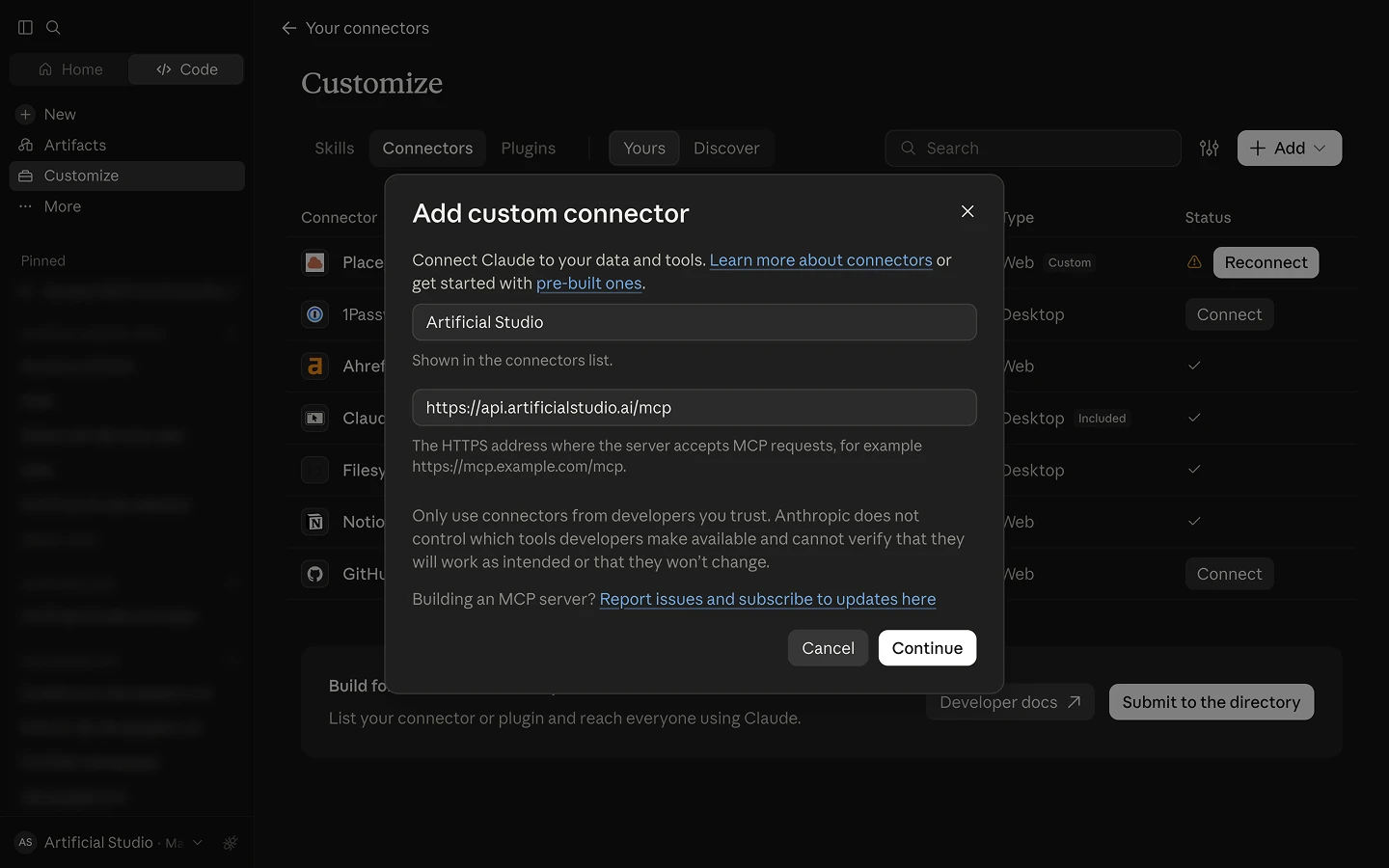
That's it. Artificial Studio now appears in your connectors, and Claude can use it in any conversation.
Method 2: Claude Code (terminal)
- Run this command in your terminal:
claude mcp add --transport http artificial-studio https://api.artificialstudio.ai/mcp - Start a new Claude Code session.
- The first time Claude uses Artificial Studio, a browser window opens. Sign in to Artificial Studio and approve access.
That's it. Your sign-in is saved, so you won't need to repeat it.
Using Cursor, Windsurf or another MCP client? Add the same URL as a remote (HTTP) MCP server. The Artificial Studio MCP quickstart has the config for each client.
Step 2: Generate a 3D model from a text prompt (text-to-3D)
The fastest route is to describe the object. For example:
"a bearded gnome in light blue clothing, as if he had powers"
Claude finds the** Text to 3D tool** and asks which 3D model you want to use, showing each option with its cost:
Which 3D model would you like to use?
- Tripo H3.1: 40 credits
- Rodin 2.5 Fast: 20 credits
- Hunyuan 3D v3.1 Pro: 75 credits
- Meshy 6: 160 credits
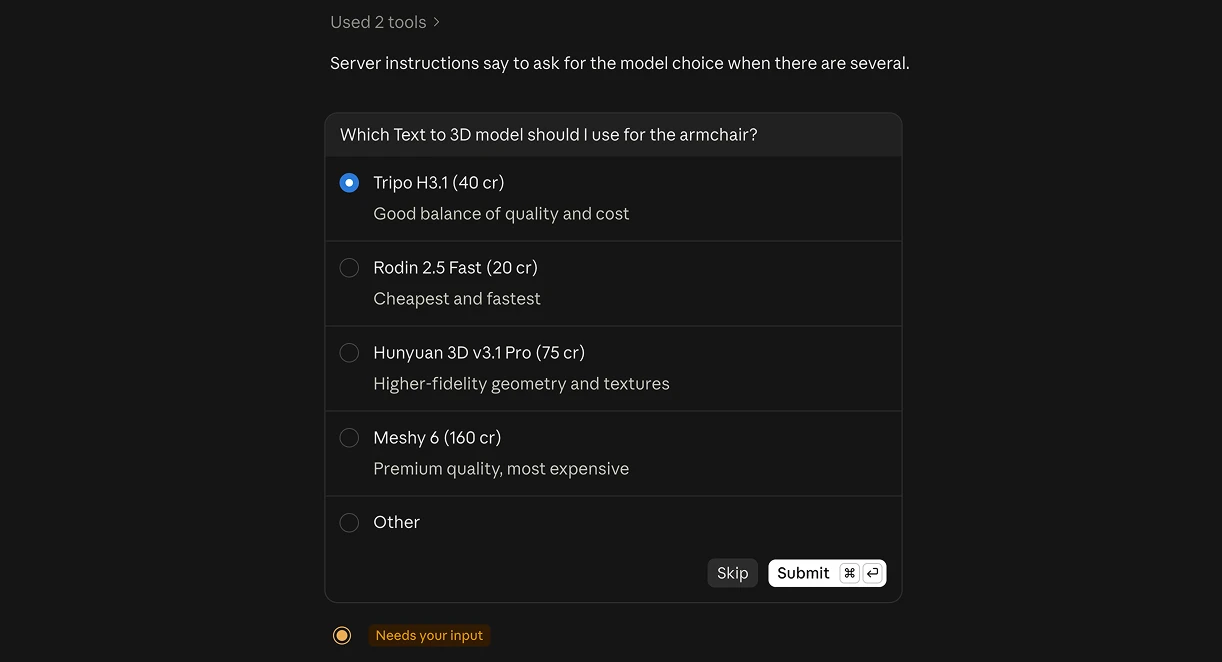
If you already know which model you want, include it in your prompt ("…use Meshy 6") and Claude skips the question.
Then Claude:
- Submits the job. 3D generation runs in the background, and Claude checks the status for you.
- Returns a download link to a
.glbfile.
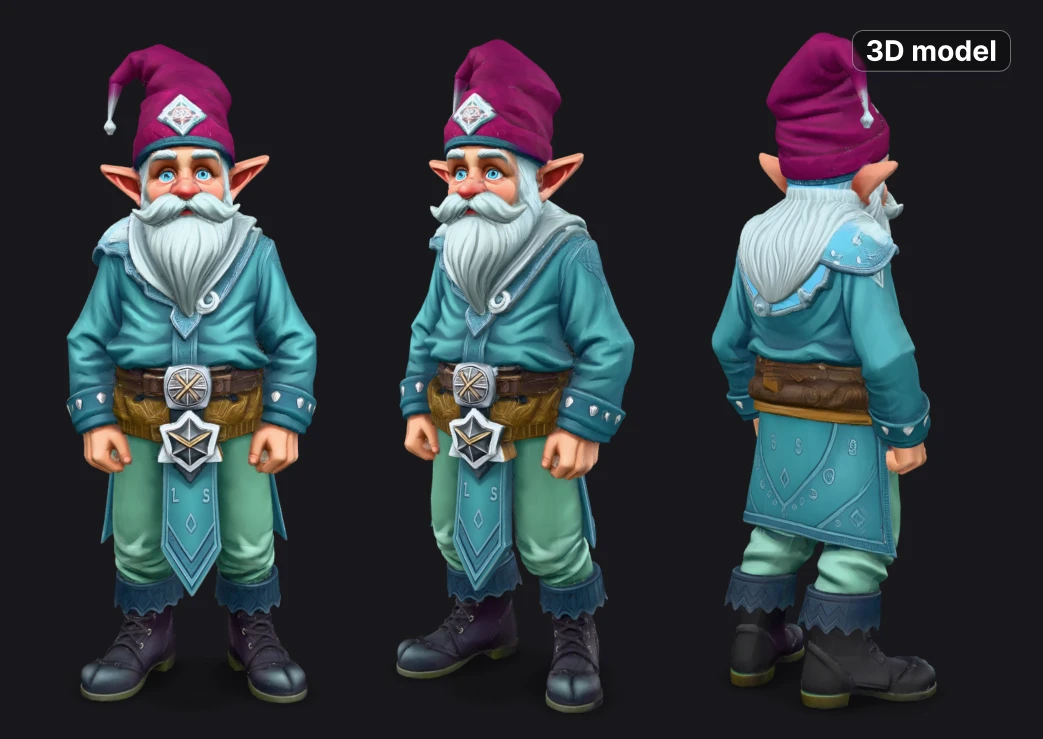
This 3D model was made using Meshy 6:
"a bearded gnome in light blue clothing, as if he had powers"
Tips for better text-to-3D prompts:
- Describe one object, not a scene.
- Include materials and colors.
- State the style: realistic, stylized, cartoon, etc.
- Mention how it will be used, for example "game-ready prop" or "product visualization".
Step 3: Generate from an image (image-to-3D)
For the most control over the final shape, especially for products, characters and brand assets, start from an image. You can do the whole pipeline in one Claude conversation:
"Create a product shot of a full-face mountain bike (MTB) helmet on a gray gradient background, profile view, with GPT Image 2.5. Then remove the background, and turn the result into a 3D model."
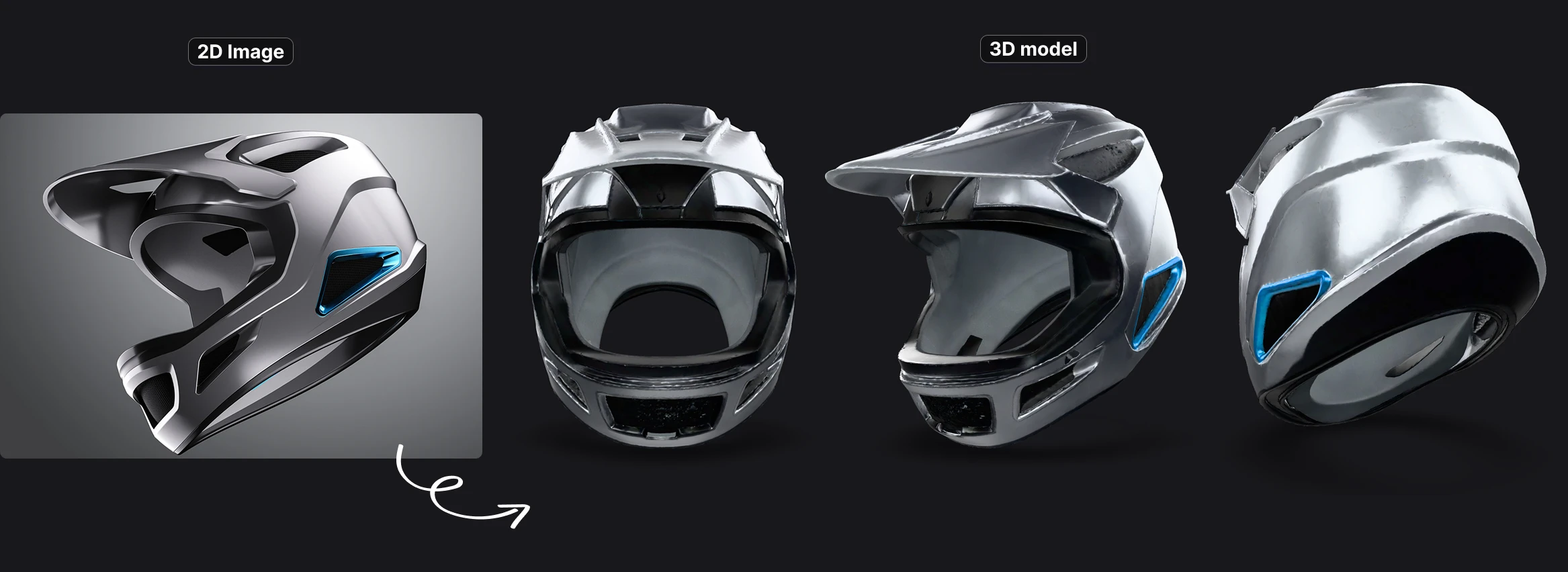
Claude chains three tools:
| Step | Tool | Model (example) | Credits |
|---|---|---|---|
| 1. Concept image | Create Image | GPT Image 2.5 | 12 |
| 2. Clean cutout | Remove Background | Background Remover | Free |
| 3. 3D model | Image to 3D | Trellis 2 | 60 |
| Total | 72 credits |
You can also use your own photo or render. In Claude Code or Claude Desktop, give Claude the local file path and it uploads the image for you.
Don't need Blender? Keep building directly in Claude
If you like the model as it is, you don't have to open Blender at all. GLB is the standard 3D format for the web and for game engines, and Claude can keep working with it in the same conversation.
→ Build a playable web game. With Claude Code (or any coding agent connected to the MCP), you can go from asset to playable game in one session:
"Generate a low-poly spaceship with Tripo H3.1, download the GLB into this project, and build a small Three.js game where I fly it through an asteroid field with the arrow keys."
Claude generates the model, saves the file, writes the game code and runs it. Need more assets? Ask for them in the same chat: "Now generate three asteroid variations and a power-up crystal." You can also generate the soundtrack and sound effects with Artificial Studio's music and audio tools, so the prototype comes with audio too.
→ Create an interactive 3D product viewer. Ask Claude to build a web page that displays the GLB with rotation, zoom and lighting controls (for example with Google's
→ Get the code for your engine. Claude can write the code to load and use the model in Unity (C#), Godot (GDScript) or React Three Fiber, and you drop the GLB into your project.
→ Render it in a scene or turn it into a video. Use 3D Studio to place the model in any scene from any camera angle, then animate the render into a video with Kling, Veo or SeeDance, all from Claude. (More on 3D Studio below.)
Optional: Import the GLB into Blender
Artificial Studio returns 3D models as GLB files, the binary version of glTF 2.0. Blender imports GLB natively, with no add-on needed.
- Download the
.glbfile from the link Claude gives you. - In Blender, go to File → Import → glTF 2.0 (.glb/.gltf).
- Select the file and click Import glTF 2.0.
Let Claude write the cleanup script
Claude is excellent at Blender Python. Ask it to "write a Blender script that imports my GLB, centers it, scales it to 1 meter tall and adds a Decimate modifier", and you'll get something like this:
GLB_PATH = "/path/to/armchair.glb"  # change to your file
TARGET_HEIGHT = 1.0                  # meters
DECIMATE_RATIO = 0.5                 # 1.0 = no reduction

bpy.ops.import_scene.gltf(filepath=GLB_PATH)
meshes = [o for o in bpy.context.selected_objects if o.type == 'MESH']

for obj in meshes:
    bpy.ops.object.select_all(action='DESELECT')
    obj.select_set(True)
    bpy.context.view_layer.objects.active = obj

    # Center the origin and move the object to the world origin
    bpy.ops.object.origin_set(type='ORIGIN_GEOMETRY', center='BOUNDS')
    obj.location = (0, 0, 0)

    # Scale to the target height and apply the scale
    factor = TARGET_HEIGHT / max(obj.dimensions.z, 1e-6)
    obj.scale = [s * factor for s in obj.scale]
    bpy.ops.object.transform_apply(location=False, rotation=False, scale=True)

    # Sit the object on the floor
    obj.location.z = obj.dimensions.z / 2

    # Reduce the polygon count
    decimate = obj.modifiers.new(name="Decimate", type='DECIMATE')
    decimate.ratio = DECIMATE_RATIO
Paste it into Blender's Scripting workspace and press Run Script.
Bonus: animate a character with 3D Motion
Artificial Studio's 3D Motion tool (Hunyuan Motion, 16 credits) generates human motion animations from text and returns them as FBX files.
"Generate a 6-second 3D motion of a person running and then jumping over an obstacle."
Import the FBX into Blender with File → Import → FBX (.fbx), then retarget the animation to your character rig. Motion length can be set from 0.5 to 12 seconds.
Bonus: render your 3D model in a scene without opening Blender
If you need a quick visual and not a full Blender scene, for example a product mockup or a client preview, use 3D Studio (from 4 credits per image). Give it a GLB model, choose the camera angle, and describe the scene:
"Render my armchair model in a sunlit Scandinavian living room with a large window and oak floors."
It's useful for presenting concepts to clients before you invest time in a full Blender render.
Prefer to stay inside Blender? Use the Artificial Studio extension
Artificial Studio also has a Blender extension that lets you generate 3D objects and video without leaving the viewport. It uses the same account and the same credits as the MCP. You can find it on the Artificial Studio plugins page, along with plugins for Ableton Live, Logic Pro and n8n.
When to use which:
- Claude + MCP: when you're planning, briefing, iterating on prompts, or chaining several steps (concept image → background removal → 3D → render). Claude picks the right model and handles the whole pipeline.
- Blender extension: when you're already working in a scene and just need another asset dropped into it.
How much does it cost to generate a 3D model in Claude?
Artificial Studio uses credits. You get free credits when you sign up, and paid plans start at $9/month for 1,300 credits (Starter), with commercial usage rights.
| What you generate | Credits | Approx. cost on Starter* |
|---|---|---|
| Quick image-to-3D test (TripoSR) | 4 | ~$0.03 |
| Text-to-3D draft (Rodin 2.5 Fast) | 20 | ~$0.14 |
| Full image-to-3D pipeline (Nano Banana + Trellis 2) | 68 | ~$0.47 |
| Production-quality model (Meshy 6) | 160 | ~$1.11 |
| 3D motion animation (Hunyuan Motion) | 16 | ~$0.11 |
*Based on $9 / 1,300 credits ≈ $0.0069 per credit. Higher plans have a lower effective cost per credit.
*Based on $9 / 1,300 credits ≈ $0.0069 per credit. Higher plans have a lower effective cost per credit.
For comparison, commissioning a single custom 3D prop from a freelancer typically costs anywhere from tens to hundreds of dollars and takes days.
Real workflows for designers, agencies and freelancers
- Product visualization for e-commerce and agencies: Photo of the product → background removal → image-to-3D → render in different scenes with 3D Studio → turn the render into a video. You get a full set of campaign visuals from one product photo.
- Game assets: Batch-generate props from a list of prompts ("a wooden barrel, a treasure chest, a rusty lantern"), import the GLBs into Blender, decimate them, and export them to Unity or Unreal.
- Architecture and interior concepts: Generate furniture and decor pieces to populate a scene in Blender.
- Character concepts: Design a character image → image-to-3D → add motion with 3D Motion → present an animated concept to the client the same day.
- 3D printing prototypes: Generate the model, then check and repair the mesh in Blender (the built-in 3D Print Toolbox helps) before exporting to STL.
Start generating 3D models in Claude and ChatGPT
- Connect the Artificial Studio MCP to Claude:
https://api.artificialstudio.ai/mcp - Ask for your first model: "Generate a 3D model of a vintage camera"
- Import the GLB into Blender with File → Import → glTF 2.0.