How to create a custom song with AI for free — Tutorial 2026
Learn how to generate original music with AI in seconds — choose your style, write the lyrics, pick the voice, and download a full custom song. Do it for free with this step-by-step tutorial.
Creating original music used to require a studio and a musician. Now you can describe a song in plain language and have it generated in seconds — complete with vocals, instrumentation, and style. This tutorial shows exactly how to do it.
Step 1: Open the Tool
Go to Create Music on Artificial Studio. You'll see a model selector, a prompt field, and a duration selector.
Step 2: Choose Your Model
Two models are available:
- Eleven Music (ElevenLabs) — best for vocal tracks, songs with lyrics, and music where the voice is a key element. 1 credit per second of audio generated.
- MusicGen — best for instrumental tracks, background music, and ambient audio without vocals.
For most use cases involving a custom song with a singer, Eleven Music is the right choice.
Step 3: Write Your Prompt
This is the core of the tool. In the prompt field, describe the music you want — style, instrumentation, voice type, tempo, and the exact lyrics you want sung. You can be as specific or as loose as you like in the text description.
This is a simple prompt that works incredible for a 10 second song, you can see it in the example image below:
"Make a jazz song with a man's mellow voice that sings "capybaras are great, I love them""
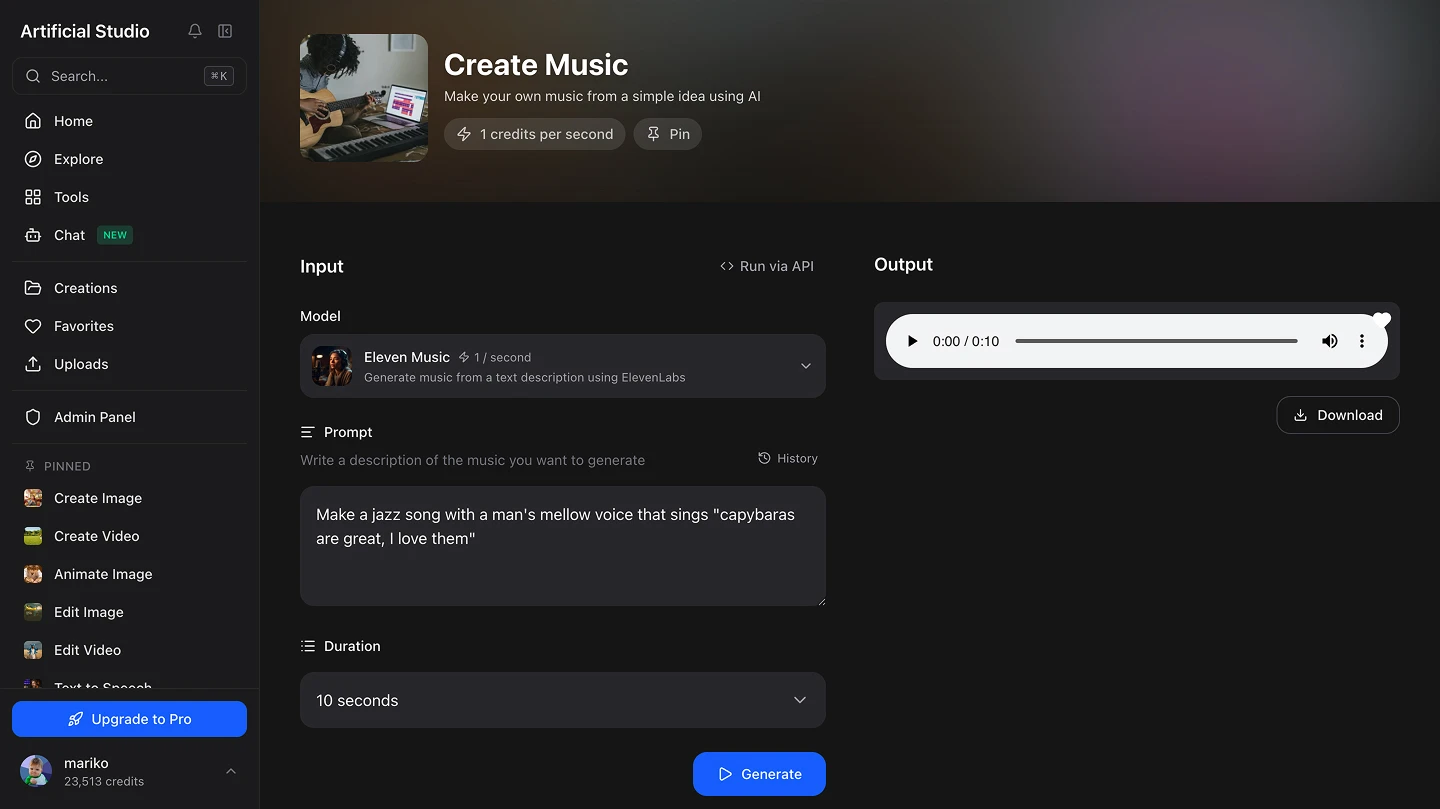
The more specific you are about genre, voice, and lyrics, the closer the output will be to what you have in mind.
Step 4: Set the Duration
Use the duration selector to choose how long the track should be — from a few seconds up to 2 minutes. For a jingle or intro, 15–30 seconds is usually enough. For a full song or background track, go longer.
Step 5: Hit "Generate"
Press the Generate button. The track renders in seconds. You can listen to it directly in the player and download it once you're happy with the result.
If the first version isn't quite right, refine the prompt and generate again. Adjust the style, change the lyrics, switch the voice type. Each iteration costs 1 credit per second of audio.
What you can actually use this for
Business jingles and ad audio. A recognizable audio brand — a short melody, a tagline sung in a consistent style — used to cost thousands to produce. Now you can generate multiple versions of a jingle in seconds, test them with your audience, and keep the one that sticks. For small businesses running ads on YouTube, Instagram or Spotify, original audio is now accessible without a production budget.
Personalized birthday and celebration songs. Write the person's name, a few lines about them, and the style you want — and get a fully original song in seconds. It's one of the most personal gifts you can give, and it takes about two minutes to create.
Background music for videos. Content creators, YouTubers, and social media marketers constantly need royalty-free background music that fits the mood of their video. Generating it with a prompt means you can match the exact energy, tempo, and tone of your content — instead of searching stock libraries for something close enough.
Podcast intros and outros. A custom intro with your podcast name sung in your chosen style makes a show sound produced and professional. It's also completely original — no licensing issues, no stock music that a hundred other podcasts are also using.
Demo tracks for musicians. Songwriters and artists can use this to quickly prototype a track concept — a chord progression, a melodic direction, a lyric idea — before investing time in a full production. It's a fast way to test whether an idea has legs.
Content for social media creators. Short original songs, funny audio clips, and custom jingles perform well on TikTok and Instagram Reels. A 15-second original track built around a trend or a brand moment is the kind of content that gets shared.
Explainer and product videos. Background music that matches the pacing and emotion of your video makes it significantly more watchable. Generate a track to spec — duration, tempo, mood — instead of trimming a stock track to fit.
Powered by ElevenLabs
The Eleven Music model in Artificial Studio is built on ElevenLabs' audio generation technology. Is one of the leading AI audio companies, known for producing natural and expressive AI voices and music. Accessing it through Artificial Studio means you get that quality directly inside a platform that also handles your video, image, and other creative production — without a separate ElevenLabs subscription.
For Developers: integrate AI Music generation into your product
If you're building a product or service that could benefit from AI music generation — a video editor, a content platform, a marketing tool, a greeting card app — Artificial Studio's API gives you programmatic access to the same Create Music tool. You can generate custom audio at scale, embed it into user workflows, or automate music creation for your platform without building the underlying model yourself.
Ready to try it? Generate your first AI track here — describe the song, set the duration, and download in seconds.