How to write Prompts for MiniMax H3 (examples, tips and full guide)
Learn how to write MiniMax H3 prompts that actually work. The 5 modes, the 3 required fields, camera and audio rules, plus examples you can copy today.
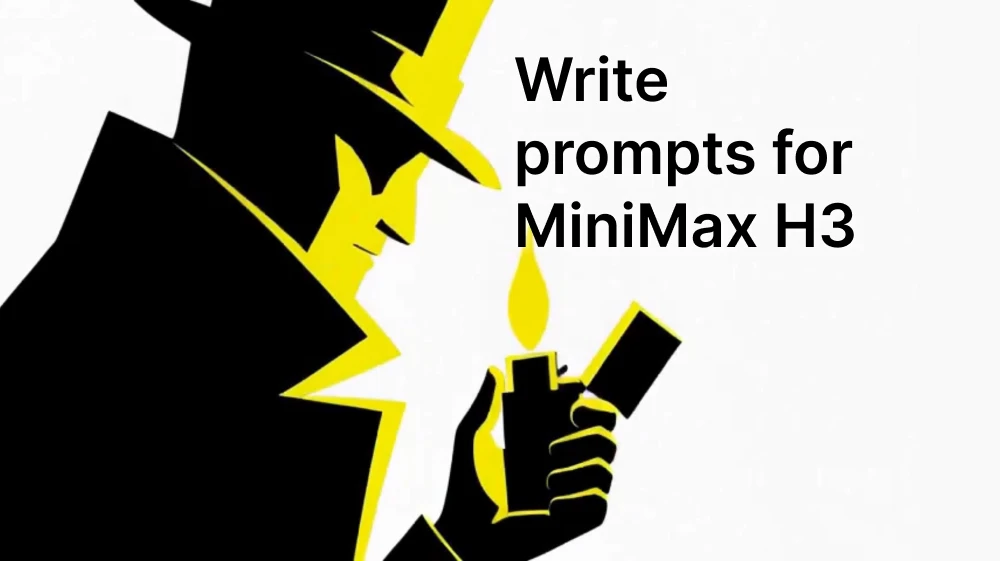
Minimax H3 don't work with just a paragraph with fancy words like "cinematic, 4k, beautiful lighting". It wants a structure.
And we know exactly what that structure is, because MiniMax published it. Tucked away in their GitHub repo is a folder of "skills".
Click here to try MiniMax H3 on Artificial Studio 🎬
The three fields that make up every H3 prompt
Every base prompt has three sections, always in this order:
integrated_multimodal_description— the main body. Visuals, actions, camera movement, shot changes, who speaks and what they say, and any sound that's physically happening in the scene. Everything laid out along the timeline.overall_soundscape— the ambient layer. Wind, traffic, footsteps, fabric rustling, breathing, a door closing. One to four sentences, written as a single paragraph.non_diegetic_music— the score. Music the characters can't hear and the audience can. One to three sentences.
Those field names are not form fields, API parameters, or code. They are part of the prompt text itself. You write integrated_multimodal_description: with those exact words, then your description after the colon, then a blank line, then the next field. The whole thing goes into a single prompt box as one block of text.
It's a formatting convention, and the model has been trained to recognize it and treat what follows accordingly. So a complete, ready-to-paste T2VA (Text to Video + Audio) prompt looks exactly like this, top to bottom:
integrated_multimodal_description: [Shot 1] Live-action, cinematic, a wide shot frames an empty basketball court at dawn...

overall_soundscape: A low wind moves across the open court while a distant highway hums.
non_diegetic_music: N/A
copy and paste it.
Diegetic vs non-diegetic
This is film school vocabulary, and it's the concept that fixes the most broken H3 prompts.
Diegetic sound exists inside the world of the video. The characters can hear it. Dialogue, a car horn, a song playing on a radio in the corner of the room, a phone ringtone, someone humming.
Non-diegetic sound only exists for the audience. The soundtrack. The score.
H3 wants these in different places:
- Dialogue, singing, and any music a character can actually hear → goes in the main description
- Ambient and physical sounds → goes in the soundscape
Score → goes innon_diegetic_music
The classic mistake is dumping everything into one field, or repeating the dialogue in the soundscape "just to be safe." Don't. If there's no score, write N/A in that field and move on. Use N/A in the soundscape only if you genuinely want silence.
Get this one distinction right and your audio stops fighting itself.
Example with prompt (you can use the same example here):
[Shot 1] Create a 15-second 16:9 hard-boiled anime silhouette motion-graphics film driven by foley synchronization. Use black silhouettes, white negative space, cobalt and acid yellow. Crisp cel contours, paper texture and mechanical masks. No text. Open on black silence. At 00:00.300, a lighter wheel clicks and one white line appears. At 00:00.600, an acid-yellow flame reveals a trench-coat detective's profile. At 00:01.000, he closes the lighter; the flame becomes a yellow rectangle that snaps shut. [Shot 2] At 00:01.500, four isolated footsteps begin. Each heel impact stamps a city layer beneath the detective: pavement, lamp posts, fire escapes, then elevated railway. His silhouette stays centered as the environment assembles. On the fifth step he stops; background layers slide three frames, then lock with a brake sound. A cobalt shadow detaches and races down an alley. [Shot 3] At 00:03.800, follow the shadow into a macro silhouette of a gloved hand disassembling a handgun. No firing or target. Magazine release, slide pull, spring release and one empty casing drop form four percussion hits. Each click drops a mask, expands a circle or rotates panels. Follow the casing downward. It bounces three times; each bounce creates a white ring and adds one instrument. [Shot 4] At 00:06.200, the third casing bounce becomes the metal tip of a closed umbrella striking wet ground. A slim female silhouette snaps the umbrella open on a loud cloth crack. Its ribs create twelve alternating cobalt and black wedges that spin once around her. Rain hits the umbrella in syncopated ticks. She pivots, blocks an incoming baton with the umbrella shaft, hooks the attacker's wrist and redirects him past her. Use five clear pose-to-pose silhouettes, one per snare or umbrella impact. No injury, blood or realistic violence. The umbrella closes with a vacuum-like snap that pulls the entire scene into a thin vertical line. [Shot 5] At 00:09.000, the vertical line becomes the seam between two subway doors. A hooded runner silhouette is visible inside. Two warning chimes sound; each chime sends an acid-yellow square around him. The doors open on the third beat and he explodes into a sprint. Every footstep swaps the background between white, cobalt and black using hard track mattes. The camera remains low beside his shoes, then whip-pans upward when he vaults a barrier. His landing creates a two-frame white impact flash followed by a half-beat of total visual stillness and near silence. [Shot 6] At 00:11.700, engine ignition breaks the silence. A black coupe enters sideways. Tire squeal draws cobalt arcs; the car drifts around the runner while the other silhouettes stand far behind. Engine rev, gear change and tire grip form three rising accents. On the final grip, motion reverses for six frames: rain rises, arcs rewind and shadows return. Time snaps forward on one full-band hit. At 00:13.700, the three human silhouettes stand under three separate pools of light: detective left, umbrella woman center, hooded runner right. The car passes behind them as one black horizontal wipe. The lighter clicks shut at 00:14.600, extinguishing every light from left to right. End at 00:15.000 on pure black and absolute silence. No title or text. FOLEY-SYNC LAW: Every major visual change begins on the exact transient of a visible sound. Lighter creates line and portrait; footsteps build architecture; metal clicks move masks; casing creates rings; umbrella creates wedges; impacts change poses; chimes create squares; landing creates freeze; engine accelerates layers; lighter close ends the film. Never drift. Use two-to-four-frame anticipation, contact on the transient and immediate follow-through. MOTION SYSTEM: Professional After Effects-style kinetic motion graphics using track mattes, shape layers, parented rotations, time remapping, posterized frame stepping, silhouette echo trails, directional blur, impact frames, counter-motion and hard occlusion. Movement is decisive and causal. No slow zoom, slow pan, idle hold except the intentional half-beat freeze, slideshow, floating cards, soft crossfade, random particles or decorative motion unrelated to sound. SILHOUETTE RULES: All people, car, umbrella, handgun, lighter and city objects remain readable flat silhouettes. Never reveal faces, skin or internal costume detail. Identify characters through outline, posture and props. Stable anatomy, correct hands and coherent action. Only black, white, cobalt and acid yellow. No red, cream, gradients, glossy 3D, photorealism, neon glow, HUD, lens flare, blood, gore, duplicate limbs or morphing. NO-TEXT RULE: Show no letters, words, numbers, logos, credits, captions, subtitles, signs, license plates, interface labels, pseudo-writing or watermark. All surfaces remain unmarked. overall_soundscape: Hyper-precise close foley in dry stereo: lighter wheel, flame ignition, lighter lid, four footsteps, brake lock, magazine release, slide pull, spring click, casing drop and three bounces, umbrella tip, umbrella snap, rain ticks, shaft contact, cloth close, two subway chimes, doors, sprinting shoes, barrier vault, landing, ignition, engine rev, gear shift, tire squeal, tire grip and final lighter close. Each sound is short, tactile and placed at its visible source. non_diegetic_music: Begin with no conventional music. Build the first six seconds entirely from foley rhythm. After each casing bounce, add one layer in order: muted upright bass, rim-click drum pattern, then dry jazz-guitar chord. At 00:06.200, introduce a restrained 144 BPM noir jazz-breakbeat shaped around the existing foley pulse, with upright bass, brushed snare, low bass clarinet and sparse vibraphone. Leave clear gaps for umbrella, train and car sounds. At 00:11.700, add full drumsticks and one short bass-clarinet phrase; stop everything for the landing freeze, then return on the engine ignition. At 00:14.600, all music stops with the lighter click. No vocals, big-band brass, constant melody, comedy swing, trap, EDM, copied music or ambient wash.
The five modes
MiniMax names for modes are actually simple once you know the pattern: the letters before the "2" are what you give the model, and "VA" is what you get back — Video plus Audio. The "2" just means "to," the way "T2I" means text-to-image.
T2VA (Text to Video + Audio) Nothing but words. The model builds the entire audiovisual timeline from your description. Most freedom, least control.
I2VA (Image to Video + Audio) You supply one image, and it becomes the first frame at second 0.00. The video develops forward from there. Best for: you already have the perfect opening shot and want it to come alive.
FL2VA (First-Last to Video + Audio) Two images. One is the beginning, one is the end. Your prompt describes the journey between them. Best for: transformations, reveals, before-and-afters.
L2VA (Last to Video + Audio) One image, but it's the final frame. The model invents a plausible earlier moment and moves everything toward landing on your image. Best for: punchlines, product reveals, "how did we get here" openers.
Ref2VA (Reference to Video + Audio) The heavy-duty mode. You feed in images, video clips, and audio as reference material, then define exactly what gets preserved, transferred, or reused. This is the one that keeps a character looking like the same person across three shots.
This line that goes before everything else
If you're using a keyframe mode, there's a required first line that tells the model how your image lines up with the video's timeline. It goes at the very top, followed by one blank line, and only then do the three fields start.
T2VA doesn't need it — with no image to align, you start straight in with integrated_multimodal_description.
For the other three, the wording is fixed:
I2VA:
For the target video, at 0.00 seconds into the target video, <Picture 1>
(from [Shot 1]) is fully referenced.
FL2VA:
How the reference pictures align with the target video — Picture 1 (from
Shot 1) aligns with the 0.00-second mark of the target video; Picture 2
(from Shot N) aligns with the S.SS-second mark of the target video.
L2VA:
How the reference pictures align with the target video — <Picture 1> (from
[Shot N]) aligns with the S.SS-second mark of the target video.
Replace N with the number of your actual final shot, and S.SS with your video's duration written to exactly two decimal places — 8.00, not 8 or 8.0. That precision isn't decoration; it's how the model knows where to land.
If you skip this line, your reference image becomes a vague suggestion, not an anchored frame. It's the single most common reason people say "it ignored my image."
Example with prompt (you can use the same example here):
integrated_multimodal_description: Create a complete 15-second Japanese flat-illustration motion-graphics commercial for a bottled mineral water in a clean 16:9 composition. The bottle is the hero of every shot: it appears within the first second, stays large and centred, and its pale blue label reading the exact Latin characters "AOI WATER" is sharp and readable in every frame it occupies. Use friendly 2D vector illustration, thick navy outlines, flat solid colour fills, and springy cutout animation with snappy overshoot easing. Compact palette of warm white, deep navy, bright aqua, deep blue and saturated yellow, where yellow carries the summer heat and aqua carries the cold refreshment. A fictional young Japanese actress supports the product, drawn as a flat vector icon with a round friendly face, simple dot eyes, a curved smile, a glossy black chin-length bob, a white short-sleeved shirt over a navy tank top; she keeps the same design in every shot. No photorealism, no 3D rendering, no gradients, no drop shadows, no browser interface, no screen-recording artifacts, no player controls.
[Shot 1] Begin on a saturated yellow field. A large white sun pulses twice at the top of the frame and wavy heat-haze lines rise from the bottom edge. At 00:00.800 a tall white bottle of AOI WATER shoots up from the bottom edge into the centre of the frame, overshooting and settling at eighty percent of the frame height, and a single white flash frame fires on the impact. Three aqua ripple rings expand from the bottle and the small navy headline assembles word by word at the top: "この夏、あつい。"
[Shot 2] At 00:02.400, a wave of bright aqua water sweeps across the frame from the left and washes the yellow away. The bottle stays centred and rotates a quarter turn to show its side. Its pale blue label assembles letter by letter into "AOI WATER" with a thin white underline drawing beneath, six round condensation drops pop onto the glass one after another, and two flat ice cubes tumble down past it.
[Shot 3] At 00:05.000, a deep blue field wipes in from the right. The bottle tilts on the left and a clear aqua stream pours in a smooth arc into a tall glass on the right; three flat ice cubes drop into the glass one at a time and bounce, throwing a radial burst of white droplets on the third. Two white snowflake marks pop in beside the glass and the kinetic word "キンッ。" stamps in with a small shake.
[Shot 4] At 00:07.600, the deep blue flips to aqua in a hard shape wipe. The actress stands centre frame holding the bottle high, tips it and drinks; a column of aqua fills her outlined body from top to bottom in three quick pulses, one per gulp, and white radial speed-lines snap outward on the third. The kinetic word "ごくっ" pops in beside her cheek and the bottle stays fully visible in her hand.
[Shot 5] At 00:10.200, a saturated yellow field wipes in from the bottom. The actress jumps once with the bottle raised above her head, her bob and shirt lifting, while flat aqua and white circles, triangles and arcs burst outward from her in a ring and three ripple rings expand from her landing point. The headline assembles in two stages: "夏に、" then "負けない。" A thick yellow underline strikes beneath the second phrase.
[Shot 6] At 00:12.600, cut to a calm warm-white end card with generous negative space. The bottle slides to the centre and scales up slightly, its "AOI WATER" label square to the viewer and perfectly readable, with a ring of six aqua droplets popping outward around it one by one. The logotype "AOI WATER" reveals in deep navy beside the bottle with a small aqua droplet mark, and the smaller line "アオイ・ウォーター" fades in beneath it. A calm, bright young Japanese woman (S1) says in an off-screen voiceover: <d>[Japanese] 夏に、負けない。</d> The end card holds sharp, centred and readable until exactly 15.000 seconds.
Throughout: flat vector motion graphics only, one palette and one line weight, the same bottle design and the same character design in every shot, and something on screen is always moving. All Japanese text in clean gothic type and the label and logotype in clean geometric capitals, correctly formed and static once placed, with no subtitles of the spoken line and no other lettering.

overall_soundscape: A deep whoosh and a short impact thud land as the bottle shoots up into frame, followed by three soft ripple taps. An airy whoosh runs under each colour wipe and a liquid sweep carries the aqua water across the frame. Rounded pops mark the sun pulses and each condensation drop, two ice cubes clink as they tumble, and a bottle cap cracks open before a clear pouring stream and three ice cubes landing in a glass. Three deep gulps and a quick refreshed exhale carry the drink, a light whoosh and landing thud carry the jump, and a clean shimmering chime rings on the logotype.

non_diegetic_music: Generate an original 15-second bright Japanese commercial cue at 128 BPM using marimba, ukulele upstrokes, hand claps, a warm round bass and a light drum kit, playing without a gap from the first frame to the last. Open with a single accent hit as the bottle lands at 00:00.800, add the full kit as the water sweeps in, thin to marimba and claps under the pour, push to the loudest point with a rising fill under the jump, drop under the spoken line, and resolve on one clean sustained chord at 15.000 seconds. No singing and no lyrics.
Writing order changes per mode
The mode changes the order you write in, not just the file you upload.
- In I2VA, you open by anchoring what's already in the image, then describe the action
- In L2VA, you do the reverse — invent a past, then push everything toward the image
- In FL2VA, the most common failure is describing two static pictures instead of the movement connecting them
One small detail that trips everyone up: in L2VA, the reference image belongs to the last shot, not the first. Write it as if it's the opening frame and the model will get confused about where it's supposed to end up.
Camera language: type + amplitude + speed
H3 has a real vocabulary for camera movement, and it wants three pieces of information:
- Type — what kind of move: push in, pull out, zoom in, zoom out, pan left/right, truck left/right, tilt up/down, pedestal up/down, arc shot, tracking shot, static shot, POV (point of view), roll clockwise/counterclockwise, or a slight or strong shake.
- Amplitude — how much the frame changes: small or large. Skip it if it's medium.
- Speed — how fast: slow or fast. Skip it if it's normal.
Two things matter about how you write it:
Write it as an action inside the sentence, not as tags bolted onto the end. Not: "medium shot, push in, slow." Instead: "The camera pushes in with small amplitude at slow speed toward the cracked screen in her hands."
And know when to move versus when to cut. A cut should introduce genuinely new information (a new subject, space, point of view, a jump in time). If all you want is to get closer or shift the angle slightly, move the camera instead of cutting. Cutting for a small framing change is what makes AI video look like a slideshow.
Click here to try MiniMax H3 on Artificial Studio 🎬
Example with prompt (you can use the same example here):
integrated_multimodal_description: [Shot 1] 2D motion graphics, flat vector
style, a deep navy background fills the frame as three thin white lines draw
themselves horizontally from left to right, then snap into a rectangle. The
camera is static. A rounded coral circle drops in from the top edge, compresses slightly on impact, and settles at the center of the rectangle. [Shot 2] At 00:02.800, the camera cuts to a close view as the coral circle unfolds into the word "SLOWER" in heavy white sans-serif type, each letter arriving one afternanother from below. [Shot 3] At 00:05.200, the camera cuts to a wide view where the word compresses horizontally into a single thin bar, which then expands into the phrase "THAN YOU THINK" in the same weight, holding centered while the navy background shifts to a warmer teal.

overall_soundscape: Short, dry mechanical clicks mark each line as it draws and each letter as it lands. A soft low thump accompanies the circle's impact and a brief airy whoosh covers the horizontal compression.

non_diegetic_music: A muted electronic pulse at a moderate tempo built from a single filtered synth note and a light closed hi-hat, with a low sub-bass note entering on the final phrase and holding.
Timestamps, shots, and cuts
The first shot never gets a timestamp. Every shot after it opens with a cut time, and those times must strictly increase and stay inside your video's duration.
[Shot 1] Live-action, cinematic, a medium-wide shot frames...
[Shot 2] At 00:03.500, the camera cuts to...
Duration on H3 runs from 4 to 15 seconds, and this is important: the amount of stuff you describe has to actually fit. Six shots in an eight-second clip will produce something frantic and half-formed. When in doubt, describe less and let it breathe.
Dialogue, speakers, and the lip-sync trick
Anyone who speaks or sings gets a stable ID: (S1), (S2), and so on. Same person keeps the same ID across every shot. Characters who never make a sound don't get one at all. Two people speaking in unison get a combined (S1,S2).
When a speaker first shows up, establish their voice: age, gender, pitch, pace, accent, whether they're on screen. Put all of that outside the dialogue tags. Inside the tags goes only the language and the exact words:
The barista with a low, unhurried voice (S1) says: <d>[English] We close in five.</d>
Two important rules:
Never translate or clean up the dialogue. Whatever words and punctuation you give it, that's what should be inside the tags, verbatim.
For voiceover, say the lips stay closed. H3 will happily animate a mouth moving to narration if you don't tell it not to. Right after the voiceover line, add that the character's lips remain completely closed.
When a line crosses a cut, tag both sides. If a sentence starts in one shot and finishes in the next, H3 has a marker for that: <scenetrans> goes at the connecting point in both parts, and you also state in plain language that the audio continues across the cut — "continues uninterrupted into the next shot," or "carries over from the previous shot." Without it you get a hard audio seam right in the middle of a word.
There's a companion tag, <cutoff>, for when speech gets truncated because the video simply ends. Useful for that clipped, mid-thought ending that makes a short feel like an excerpt from something longer.
Text on screen
Any sign, banner, label, subtitle, or neon glow that's actually visible goes in double quotation marks, exactly as written, untranslated. If your café sign says "ABIERTO", write "ABIERTO", not "OPEN". The model reproduces what's in the quotes.
Kill your adjectives
Every detail in your prompt should correspond to something a viewer can see or hear. "Cinematic," "beautiful," "epic," "high quality," "emotional" none of these are instructions. They're vibes, and the model can't render that.
Style does get declared, but with concrete labels at the top of the first shot: live-action, 2D-animated, 3D CG (computer graphics), claymation, watercolor, vintage film.
The same rule applies to music, and it's strict. Describe instrumentation, tempo, rhythm, and how the volume changes. Don't describe the feeling you want the audience to have. So not "tense, building music that creates unease." Instead: "A single detuned piano note repeating at a slow tempo, joined by low strings that grow louder before cutting off abruptly."
Example with prompt:
I used these two images to generate a 15-second explainer video in this style:
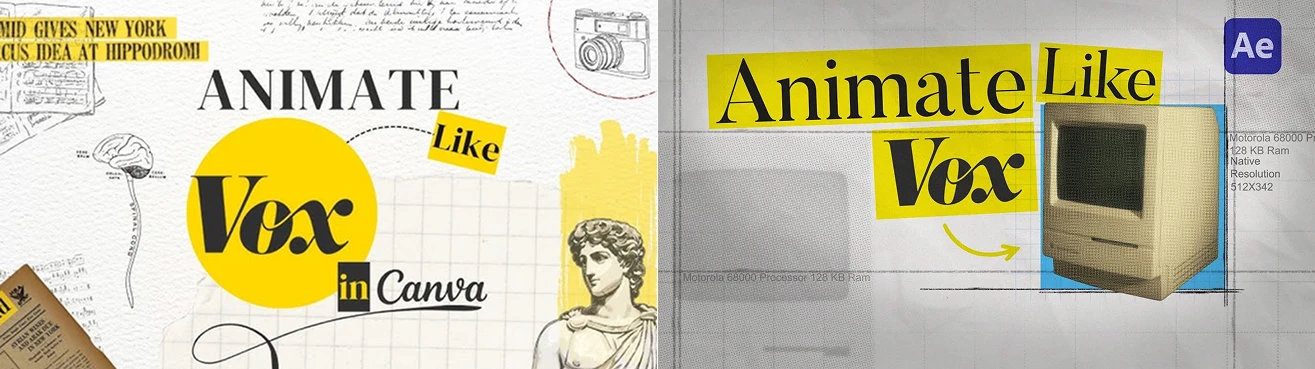
I added them to Artificial Studio as References (you can do the same here).
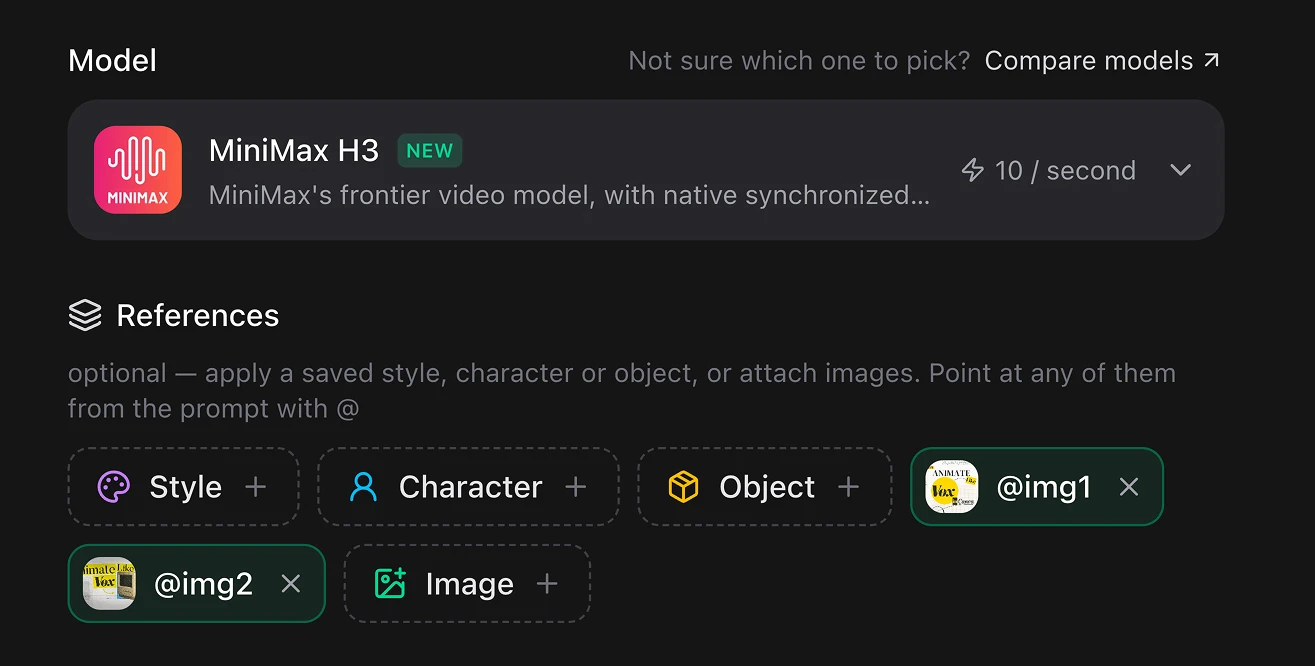
Then, after pasting this written prompt, this was the result:
A 15-second vertical 9:16 Vox-style documentary explainer short about why keyboards say QWERTY.

Style: Clean Vox motion graphics aesthetic – bold condensed kinetic typography, yellow highlighter accents, flat illustrated icons, subtle paper texture, muted archival-style backgrounds with film grain, smooth push-ins, quick cuts, callout lines and diagram arrows. Energetic but calm documentary feel. Consistent yellow/black/off-white palette. No real brand marks on any typewriter or device.

Structure timed exactly: 0-3.2s (Hook): Top-down illustrated view of a modern keyboard on a desk. The camera pushes in slowly toward the top-left letter row. Bold white letters stamp on one by one over the keys: "Q W E R T Y". A yellow highlighter sweeps under them. Calm narrator: "Look at your keyboard. Why this order?" 3.2-7.8s (The problem): Cut to a flat illustrated 1870s typewriter, cross-section view, generic and unbranded. Two metal typebars swing up, collide mid-air and lock together. A red callout line points at the jam with the text "JAM". The image rewinds and the letters visibly slide apart across the keyboard diagram, yellow arrows tracing each one to its new position. Text stamp: "1874".
Narrator: "Eighteen-seventies typewriters jammed, so the common letters were pulled apart." 7.8-12s (Why it stuck): Split-screen illustration – on the left the typewriter
fades into grey and dissolves; on the right a chain of devices appears in
sequence, each drawn flat and generic: electric typewriter, desktop computer, laptop, smartphone. The same QWERTY row carries across all of them, highlighted in yellow. Small illustrated hands type on each device. Text stamp: "THE JAM IS GONE". Narrator: "The jamming stopped. The layout stayed — everyone had learned it." 12-15s (Close): Quick push-in back to the modern keyboard from the opening shot, now with the Q W E R T Y keys glowing yellow. Bold final text stamps centered: "A FIX FOR A PROBLEM THAT NO LONGER EXISTS". Yellow accent underline sweeps beneath it. Narrator: "You're still typing around a dead problem."

Overall: High-energy educational short, legible text at all times, smooth camera moves, soft documentary music bed with light percussion hits landing on each text stamp. Ends holding on the glowing keyboard. Perfect for TikTok/Reels/YouTube Shorts.
Ref2VA: the mode with six sections instead of three
Everything above covers the four base modes. Ref2VA plays by different rules, and if you're doing anything with recurring characters, it's worth the extra effort.
Instead of three fields, you write six, in this order:
subject_definitions— every piece of referenced content, labeledsummary— the task type and the main reference relationships, brieflyretention_analysis— where each reference shows up and what happens to itdetailed_description— the same job as the multimodal description in base modesoverall_soundscapenon_diegetic_music
The four label types:
<Subject N>— reusable visible content: a person, an animal, a room, a jacket, a visual style, a pose. This is the thing that appears in your video.<Picture N>— a reference image used as an actual frame or composition anchor<Video N>— a reference video used for editing, continuation, or its timing structure<Audio N>— an audio signal being copied or referenced
<Subject N> is content, the other three are sources. If an image exists only to define what a character looks like, it doesn't get its own <Picture N> entry — you cite it inside the subject's definition instead:
<Subject 1> is the woman whose appearance comes from <Picture 1> and whose
walking motion comes from <Video 1>.
One subject can pull from several files. One file can supply several subjects. And once a label means something, it means that same thing in all six sections — no renaming halfway through.
Retention analysis is where the control lives
For each reference, you state where it appears and what happens to it: fully preserved, partially preserved, transferred, or reused as a reference rather than copied.
That last distinction is subtle and powerful. Using an audio clip as a voice timbre reference means the model matches the vocal character without reproducing the original recording, which is how you keep one narrator sounding like the same person across a dozen clips.
Before and after
Here's a prompt most people would write:
A woman sitting on a train looking out the rainy window, cinematic, sad, emotional music, she says she's getting off at the next stop.
And here's the same idea, restructured for H3:
integrated_multimodal_description: [Shot 1] Live-action, cinematic, a medium shot frames a woman in her thirties beside a rain-streaked train window, city lights sliding past behind the glass. The camera trucks right with small
amplitude at slow speed as she lifts her eyes from a folded ticket in her lap. The woman, with a quiet voice and slightly slow delivery (S1), says:
<d>[English] I'm getting off at the next stop.</d> She folds the ticket once
more along its existing crease and closes her hand around it.

overall_soundscape: The train wheels keep a steady metallic rhythm under a low ventilation hum. Rain ticks against the window and paper creases softly in her hands.

non_diegetic_music: Sustained cello at a slow tempo with widely spaced piano notes, gradually dropping in volume toward the end.
Longer? Yes. But look at what the second version actually specifies: one camera move with a defined speed, a voice with a described texture, a physical action to fill the silence after the line, ambient audio that isn't fighting the dialogue, and a score with real instruments instead of the word "sad."
Example and prompt (you can use the same example here):
[Shot 1] Create a 15-second 16:9 mid-century silhouette motion-graphics film driven by foley synchronization, in the style of late-1950s American graphic design and UPA-era limited animation. Use charcoal silhouettes, cream negative space, burnt orange, teal and mustard. Flat cel shapes, screen-print grain, visible paper fiber, hard geometric masks. No text. Open on cream silence. At 00:00.300, a vault dial clicks once and a single charcoal arc appears. At 00:00.600, three rapid tumbler clicks rotate the arc into a full circle. At 00:01.000, the bolt throws with a heavy metal thunk and the circle snaps open into a burnt-orange wedge.

[Shot 2] At 00:01.500, four running footsteps begin. Two robber silhouettes — one broad and low, one thin and tall, each carrying a rounded money sack — sprint left to right. Each heel impact stamps one city layer behind them: sidewalk, striped awnings, streetlamps, then a stepped skyline of teal rectangles. On the fourth step the tall one glances back; the background slides three frames and locks with a brake accent. A charcoal shadow detaches from a rooftop and drops out of frame.

[Shot 3] At 00:03.800, follow the shadow into a macro silhouette of a gloved hand loading a spring-line launcher. No firearm. Catch release, cable feed, tension wind and one anchor-hook click form four percussion hits. Each click drops a mask, expands a mustard circle or rotates a panel. Follow the cable upward as it uncoils. It whips three times; each whip creates a cream ring and adds one instrument.

[Shot 4] At 00:06.200, the third cable whip becomes the hook biting into a lamp post with a metal bite. The masked acrobat swings down in one continuous arc, silhouette clean and elongated, cape-less, streamlined. His arc leaves twelve alternating teal and charcoal wedges fanning behind him like a shutter. He lands in front of the getaway car on a full-band hit and the car's headlight beams split the frame into two mustard triangles. He straightens slowly. Total stillness for a half beat.

[Shot 5] At 00:09.000, the robbers turn and charge. The action is five clear pose-to-pose silhouettes, one per snare hit: the broad one swings, the acrobat ducks under and the sack bursts into a cloud of cream rectangles; the cable loops the thin one's ankle and he is lifted upside down out of frame; the broad one is redirected past the acrobat and slides off-screen into a stack of trash cans. Impacts are graphic and comic, never anatomical. No injury, blood or realistic violence. The final can lid spins on the ground and its rotation pulls the whole scene into a thin horizontal line.

[Shot 6] At 00:11.700, a police whistle breaks the silence. The horizontal line becomes a squad car's roof as it enters from the left. Siren, door slam and handcuff click form three rising accents. The acrobat fires his line upward; on the last accent, motion reverses for six frames — cream rectangles reassemble into the sack, the cable rewinds, the wedges close. Time snaps forward on one full-band hit and he is gone.

At 00:13.700, three separate pools of mustard light hold three silhouettes: the two robbers seated on the curb left and center, and a policeman right, hat brim raised toward the rooftops. The squad car passes behind them as one charcoal horizontal wipe. The vault dial clicks shut at 00:14.600, extinguishing every light from right to left. End at 00:15.000 on pure cream and absolute silence. No title or text.

FOLEY-SYNC LAW: Every major visual change begins on the exact transient of a visible sound. The dial creates arcs and the wedge; footsteps build architecture; launcher clicks move masks; cable whips create rings; the hook creates the swing; impacts change poses; the whistle brings the car; the dial close ends the film. Never drift. Use two-to-four-frame anticipation, contact on the transient and immediate follow-through.

MOTION SYSTEM: Professional After Effects-style kinetic motion graphics using track mattes, shape layers, parented rotations, time remapping, posterized frame stepping, silhouette echo trails, directional blur, impact frames, counter-motion and hard occlusion. Movement is decisive and causal. No slow zoom, slow pan, idle hold except the intentional half-beat freeze, slideshow, floating cards, soft crossfade, random particles or decorative motion unrelated to sound.

SILHOUETTE RULES: All people, car, sacks, launcher, lamp post and city objects remain readable flat silhouettes. Never reveal faces, skin or internal costume detail. Identify characters through outline, posture and props: the broad robber by a flat cap and bulk, the thin robber by a narrow brim and length, the acrobat by a smooth masked head, tapered waist and long limbs. Stable anatomy, correct hands and coherent action. Only charcoal, cream, burnt orange, teal and mustard. No red, gradients, glossy 3D, photorealism, neon glow, HUD, lens flare, blood, gore, duplicate limbs or morphing. Do not depict any existing comic-book, film or television character; all figures are original designs.

NO-TEXT RULE: Show no letters, words, numbers, logos, credits, captions, subtitles, signs, license plates, interface labels, pseudo-writing or watermark. All surfaces remain unmarked.

overall_soundscape: Hyper-precise close foley in dry stereo: vault dial, three tumblers, bolt throw, four footsteps, brake lock, catch release, cable feed, tension wind, anchor click, three cable whips, hook bite, swing wind, landing, cloth rush, five impact hits, trash-can clatter, spinning lid, police whistle, siren, door slam, handcuff click and final dial close. Each sound is short, tactile and placed at its visible source.

non_diegetic_music: Begin with no conventional music. Build the first six seconds entirely from foley rhythm. After each cable whip, add one layer in order: walking upright bass, brushed snare, then muted trumpet stabs. At 00:06.200, introduce a restrained 152 BPM late-1950s cool-jazz cue shaped around the existing foley pulse, with upright bass, brushed kit, baritone sax and sparse vibraphone. Leave clear gaps for the launcher, the landing and the siren. At 00:11.700, add a short punchy brass shout and one walking bass run; stop everything for the half-beat freeze, then return on the whistle. At 00:14.600, all music stops with the dial click. No vocals, no big-band wall of brass, no constant melody, no comedy swing, no trap, no EDM, no copied music, no ambient wash
Going past 15 seconds
H3 generates up to 15 seconds at a time, so longer pieces get stitched. The approach that works:
- Break the piece into shots and generate them individually
- Use the last frame of one clip as the first frame of the next
- Cut on the beat if there's music, land your cuts on a pause, a breath, or a drum hit, never mid-vowel in a spoken word
- Carry the same style header into every single generation: same grain, same color direction, same lighting direction
- Lock one master audio track for the whole piece and align the clips to it, rather than letting each clip carry its own audio
That last point is the one people skip, and it's why stitched AI video so often sounds like five different rooms glued together.
The quick checklist
Before you hit generate:
- Three fields, in order, with the labels typed out literally
- Using a keyframe mode? Alignment line first, blank line after it, duration to two decimals
- Dialogue in the main description, ambience in the soundscape, score in non_diegetic_music — nothing repeated between them
- Camera moves written as actions, with amplitude and speed where they matter
- Cuts only where there's new information; otherwise move the camera
- Timestamps increasing, first shot has none, everything fits the duration
- Speaker IDs consistent, dialogue verbatim, lips closed on voiceover
- Lines crossing a cut tagged on both sides
- On-screen text in quotes, untranslated
- Zero abstract adjectives; music described by instrument and tempo
- Ref2VA: six sections, and every label means the same thing in all of them
--
What makes Minimax H3 different
Minimax H3 generates video and audio together, dialogue with matching lip movement, footsteps that land when the foot lands. And even rain that gets louder as the camera pushes toward the window.
That's why the prompt format looks unusual at first. You're not describing a picture that moves, you're describing a timeline that has both a picture track and a sound track, and the format exists to keep those two things from drifting apart.