How to make a 3D version of your brand mascot (free)
Turn your brand mascot into a 3D model from a single image, without hiring a 3D artist. Use Idol Max Turbo or Rodin 2.5 Fast, get a GLB file in seconds, and do it for free.
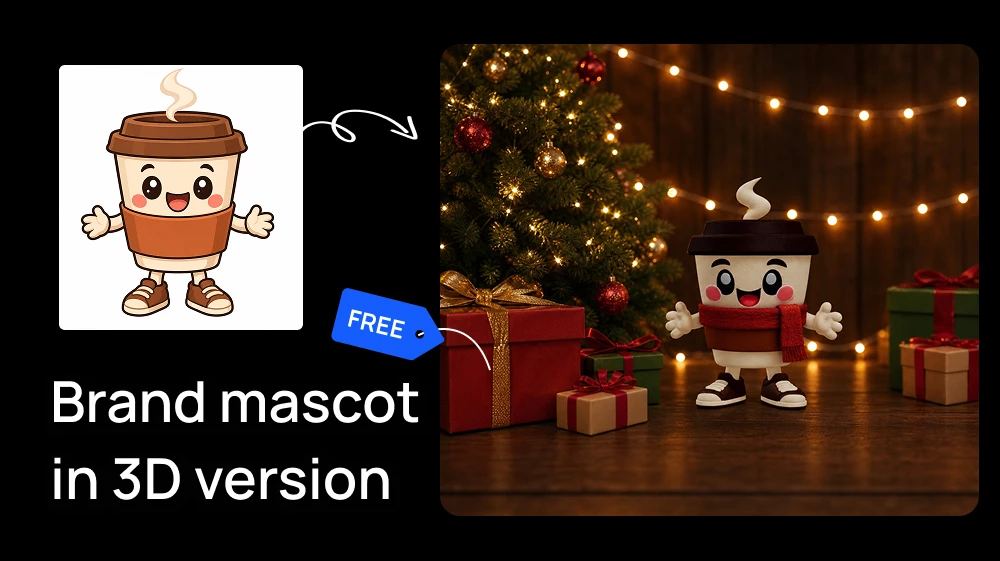
Your client has a mascot, always flat and from the same angle. Now they want it in 3D: for a campaign, a product launch or a short ad. Hiring a 3D artist means a quote, a brief and days of back and forth for a single character.
With Image to 3D on Artificial Studio, you upload one image of the mascot and get a 3D model in seconds. You can use the two cheapest/free models in the tool: Idol Max Turbo and Rodin 2.5 Fast. Then you can render the model from any angle, put it in any scene and even animate it.
In this guide we'll do it with cuppy, the cartoon coffee cup mascot of Sunday Roast, a coffee shop.
Step 1: Turn the 2D drawing into a 3D-style image in Create Image
A flat 2D illustration has no shadows or volume, so the 3D model has to guess the shape of your mascot, and the result usually looks off. The fix is to first create a version of the mascot that already looks 3D, and use that image to build the model.
Open Create Image, use a good model like GPT Image 2.6 and click Image in References and upload the 2D illustration of your mascot. Then write a prompt like this one:
Turn this character into a 3D animated mascot character. Keep the exact same design, proportions, colors and facial expression. Smooth materials, soft studio lighting, full body, front view, standing, plain white background, no text.

Press the blue Generate button. In seconds you get your mascot as if it came out of an animated movie: same character, now with real volume, light and shadows. That's exactly the information Image to 3D needs to build a good model.
💡 Does the mascot only exist in a side pose or a cropped version? Use Edit Image with a prompt like "full body front view of this character, standing, plain white background" to get a version that works better for 3D. If you need the same mascot in other poses or angles, Character Variation gives you those too.
Don't have a mascot yet? Create one first with the same tool!
Step 2: Turn it into 3D with Idol Max Turbo or Rodin 2.5 Fast
Open Image to 3D and choose one of the two cheapest models. Both cost 20 credits per model:
- Idol Max Turbo: built by fal on top of SperidLabs' Idol model. It's the newest of the two and gives you a model in about 20 seconds.
- Rodin 2.5 Fast: the fast version of Rodin, from Hyper3D, one of the best-known image-to-3D models.
Upload your image. No prompt, no settings. Press the blue Generate button, and in seconds you get a textured 3D model you can spin around in the preview. When it looks right, download it as a GLB file, the standard format that opens in Blender, Unity, Unreal Engine, Three.js and most 3D viewers.
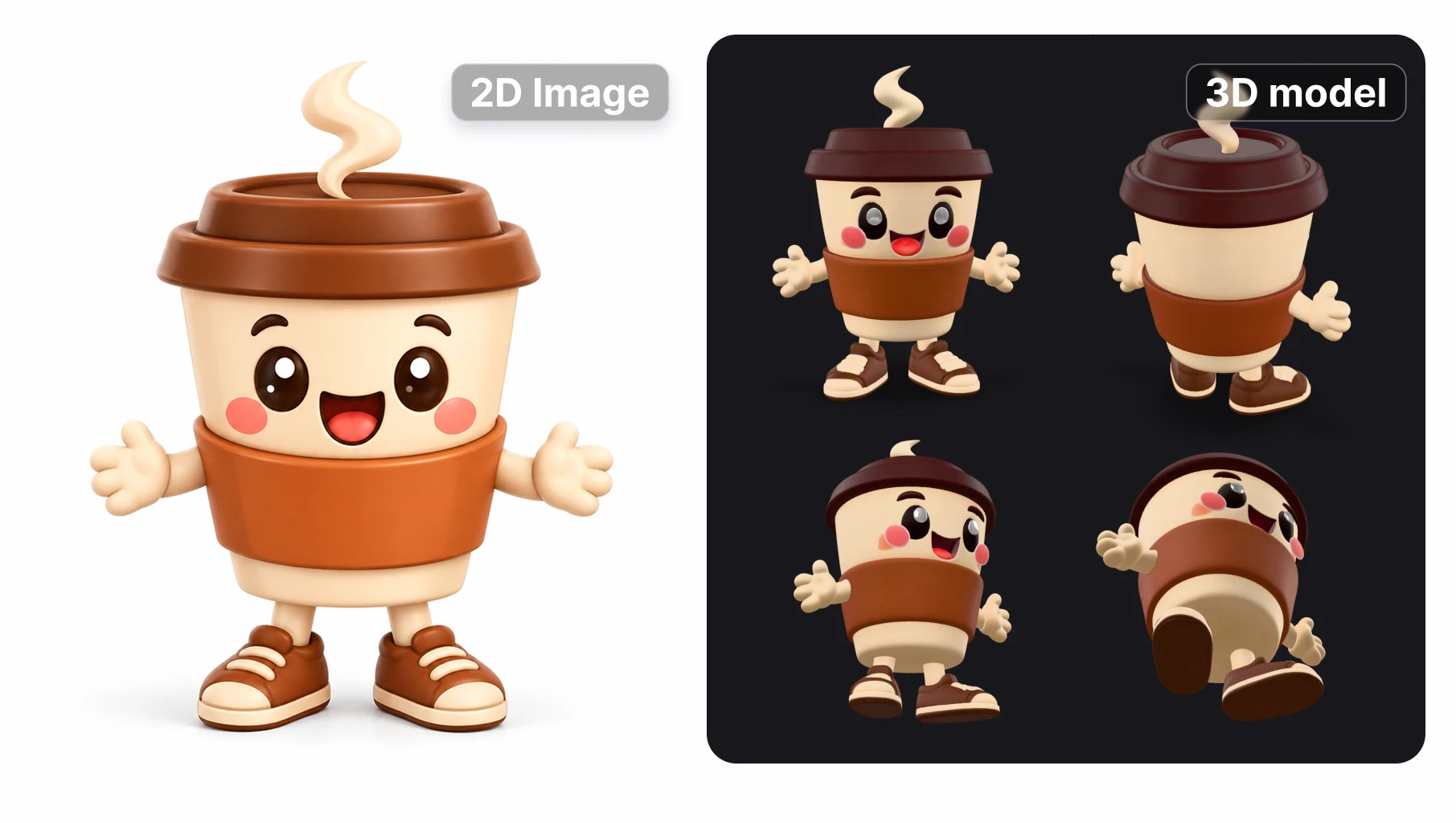
💡 Which one should you use? Each model reads the image differently, so the best way to choose is to try both with the same image and keep the one that looks more like your mascot. That's 40 credits, two days of free credits.
Not happy with the shape? The image is almost always the reason 🖼️ Try a cleaner front view and generate again.
Need more detail? Try the premium models
Idol Max Turbo and Rodin 2.5 Fast are perfect to explore, pitch and make quick campaign assets. But they aren't the most detailed models in the tool. If the 3D mascot will star in a TV ad, a large print or a final product, Image to 3D has four more models you can use with the same image:
| Model | Credits | Cost on Starter | Use it for |
|---|---|---|---|
| Idol Max Turbo | 20 | ~$0.14 | Exploring and pitching, free once a day |
| Rodin 2.5 Fast | 20 | ~$0.14 | Exploring and pitching, free once a day |
| Hyper3D Low Poly | 40 | ~$0.28 | A stylized low-poly look, great for games and playful brands |
| Trellis 2 | 60 | ~$0.42 | A more detailed final model |
| Tripo H3.1 | 60 | ~$0.42 | A more detailed final model |
| Hunyuan 3D v3.1 Pro | 75 | ~$0.52 | The most detailed result, for hero assets |
A good workflow is to explore with the cheap models and switch to a premium one once the client approves the direction. And even the most expensive model costs about 52 cents, still a fraction of what you'd pay a 3D artist to model, texture and deliver a character from scratch.
Step 3: Render your mascot from any angle
A GLB file is great for a 3D artist, but your client wants images. Open 3D Model Render and upload the GLB file. Frame the mascot from any angle, then write what you want in the prompt:
this character on a wooden café counter, warm morning light, soft shadows, shallow depth of field
this character wearing a tiny red scarf next to a Christmas tree and wrapped gifts, warm string lights in the background, festive and cozy
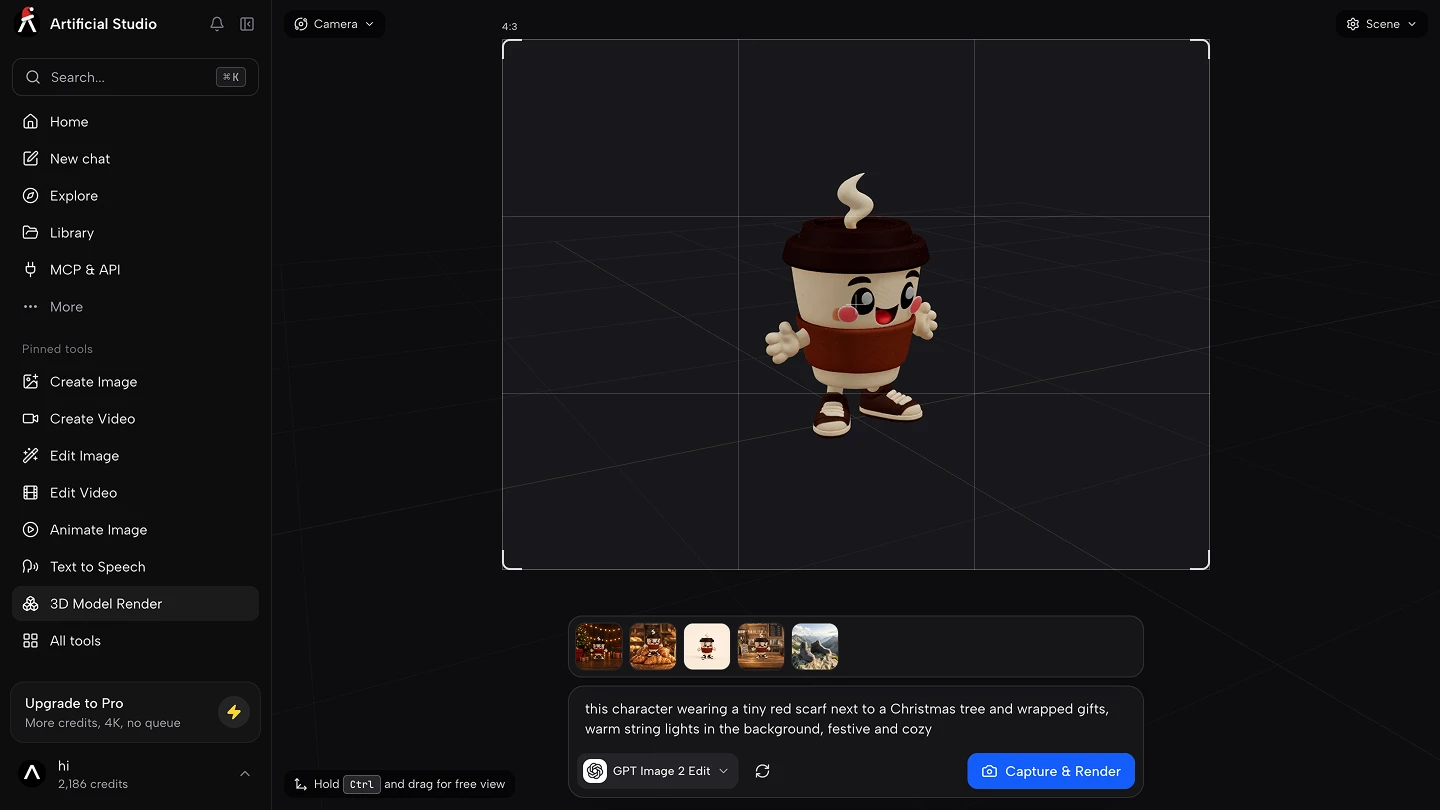

The tool keeps the shape and angle of your model and transforms it into a finished image. You can choose the AI model that does the transformation: FLUX.2 Klein costs 4 credits, and GPT Image 2 Edit costs 10 credits and gives the best result.
Repeat it from different angles and you have a full set: a hero image for the website, a close-up for Instagram and a three-quarter view for the menu board.
Step 4: Take it further
Once your mascot has a 3D version, it can go places a flat drawing can't:
- Animate it in Blender. The GLB has no skeleton, but you can add one. Our guide on making custom animations for Blender without motion capture shows how to rig a model with the FBX skeleton from 3D Motion and make it walk, wave or jump.
- Put it in a video ad. Save your renders as a Character in Concepts and use it in Create Video. We explain how in this article.
- Use it in a game or an AR experience. GLB is the format used by game engines and 3D web viewers. If you want to build a full scene, read how to generate 3D models with Claude and Blender.
- Match the brand colors. If a render comes out in the wrong tones, fix it with Color Palette. Our guide on recoloring images to your brand colors shows how.
Example: cuppy goes 3D
Sunday Roast already has 4 illustrations of cuppy, its coffee cup mascot, saved in Concepts. Here's how their agency turned it into 3D in one afternoon:
- The image: they picked the front-facing illustration of cuppy, standing with its arms open.
- The 3D model: Image to 3D, you can use the free models Idol Max Turbo or Rodin 2.5 Fast (Artificial Studio gives you 20 free credits a day, so you can make one per day). For the best results, try Trellis 2 or Hunyuan 3D v3.1 Pro.
- The renders: in 3D Model Render they made three images from three angles: cuppy on the café counter, cuppy next to a pumpkin spice latte, and cuppy waving from the shop window.
- The pitch: they showed the client the 3D mascot before quoting a full 3D animation project. The client approved the direction in the first meeting.
Who this is for
This is for freelance designers and agencies who need to show a client their mascot in 3D before committing to a full 3D project, and for marketers who want 3D brand assets without a 3D budget. It's also useful for small brands and startups whose mascot only exists as a flat drawing and needs to show up in more places: an ad, a sticker pack, a product launch or a game.
The problem it solves is the first step. A 3D artist is still the best option for a fully custom, hand-polished character. But to test an idea, pitch a direction or make a campaign asset, a 3D model in seconds is all you need, and you choose how much detail to pay for.
Do it from Claude
Have several mascots or several clients? Ask Claude to do it with the Artificial Studio MCP:
Turn these 3 mascot images into 3D models with Image to 3D. Make one version with Idol Max Turbo and one with Rodin 2.5 Fast for each image, and give me the GLB links so I can compare them.
Claude runs each image with both models and gives you the download links. It uses the same credits as the web tool.
To connect it:
- Claude (web or desktop): go to Settings → Connectors → Add custom connector and paste https://api.artificialstudio.ai/mcp.
- Claude Code: run claude mcp add --transport http artificial-studio https://api.artificialstudio.ai/mcp.
The first time you use it, a window opens to sign in to Artificial Studio. No API key needed.
This process is FREE
Artificial Studio gives you 20 free credits every day, with no card required. Idol Max Turbo and Rodin 2.5 Fast cost exactly 20 credits per model, so you can make one 3D mascot a day for free with either of them. Want to compare both? Make one today and the other tomorrow.
Want it all at once? With $9 you get 1,300 credits. Both 3D models (40 credits) plus five renders with GPT Image 2 Edit (50 credits) come to 90 credits, about 62 cents for a 3D mascot and a full set of images.
Your free credits reset tomorrow either way!